Universal Personal VPN Server — SSD VDS Plus Streisand
Set up a personal VPN server effortlessly with our SSD VDS and Streisand. Enjoy high-speed connectivity and multiple protocol options for secure browsing.
Universal Personal VPN Server — SSD VDS Plus Streisand
Our high-speed SSD VDS is ideal for setting up private VPN servers. We provide virtual servers with unlimited traffic and excellent connectivity, available in seven locations across Europe, the USA, and Asia. We simplify VPN setup by offering pre-configured SSD VDS with personal VPN servers installed, featuring options like OpenVPN-AS or IPSec-VPN. Our latest addition, StreisandVPN, automates the installation process for an ultimate VPN solution.

Overview of Streisand Project
Streisand is a collection of specially configured server applications running on a standard Ubuntu 16 LTS virtual server. Here’s what you get:
- Cisco AnyConnect/OpenConnect: Lightweight yet effective for most OS platforms. Notably, it’s often unblocked by firewalls and serves corporate needs.
- OpenVPN: A widely recognized solution with five pre-configured keys allowing cyclic port switching (UDP/8757, TCP/636, TCP/443), making it suitable for constant use.
- OpenVPN+stunnel: For added security; this setup is robust against blocking and resembles regular SSL data streams.
- Shadowsocks: An encrypted Socks5 version featuring UDP support, originally for bypassing restrictions in China.
- SSH Tunnel: A secure method utilizing the SSH protocol, enabling encrypted connections without extensive setups.
- Private TOR Exit Node: When other options fail, use Streisand as a TOR network exit node for added anonymity, though speed may be compromised.
Each method can be utilized independently or together, enhancing flexibility. For example, connect your iPhone with OpenVPN and your work computer with Cisco AnyConnect.
How to Get Your Own VPN Server with Streisand
-
Create an account in our self-service system at my.itldc.com and confirm your email.
-
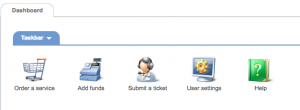
Log in and click the Order Service button on the main page:
-
Select the product type — virtual servers:

-
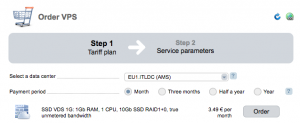
Choose your SSD VDS data center and tariff plan; typically, the minimal plan suffices:
-
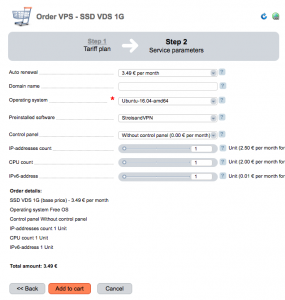
Select Ubuntu 16.04 as your operating system and specify the software recipe — StreisandVPN:
-
After placing your order, installation may take up to 30 minutes. You’ll receive an email with access parameters.
-
Connect to your VPN server using the provided IP address and username/password. Access instructions will guide you on setting up your secure connection.
Recommended Reading
- - Description of Streisand, technical features
- - What is the “Streisand Effect”?
- - What is stunnel?
- - OpenConnect project
- - Shadowsocks — almost like a VPN, but not a VPN
Want to start using your own VPN right now?
Order any virtual server on SSD drives, enter the coupon VPN-ON-VDS, and you’ll get a permanent 10% discount! Besides Streisand, we also support the automatic installation of OpenVPN-AS and IPSecVPN — choose the most convenient option. Join us!
Need Help?
Our support team is available 24/7 to assist you with any questions or issues.
Contact Support