Virtual server with Vesta? Very easy!
Learn how to easily set up a virtual server with the Vesta control panel and enjoy a hassle-free web hosting experience.
Virtual Server with Vesta? Very Easy!
The free Vesta control panel has earned its popularity among our users. We have made it even easier to start working with this panel – we have prepared a special SSD VDS template based on CentOS 7 with the ready-to-use Vesta Control Panel!
Despite being a free product, the Vesta control panel has all the necessary features for server management – you can easily perform all required actions without resorting to the command line. Installation is not particularly difficult – just upload the installation script to the server, run it, and in a few minutes, Vesta will be installed. Now this step can be done automatically – when ordering any SSD VDS, you can choose a specially prepared CentOS 7 distribution with Vesta pre-installed.
Why You Should Take Advantage of This Option:
- CentOS 7 is a current, stable version of the Linux operating system, featuring thoroughly tested components. Support for CentOS 7 is scheduled until 2024.
- Includes PHP 5.4.x, with the possibility of upgrading via third-party repositories.
- Uses MySQL-compatible MariaDB version 5.5.x. More about the advantages of MariaDB can be found on the official product site.
How to Order SSD VDS with the Pre-Installed Panel?
It’s very simple – in the service preparation wizard in the ITLDC self-service system, select “Vesta Control Panel, CentOS 7” and within 10-15 minutes, the SSD VDS with the installed Vesta control panel will be ready for use.
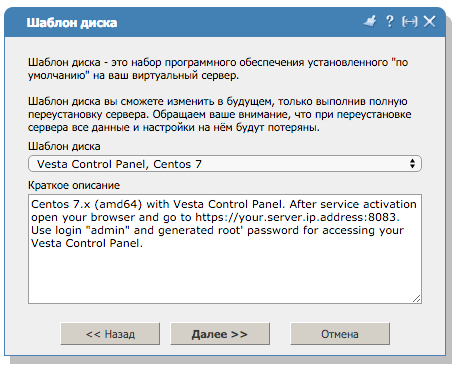
To log in to the panel, use the standard username admin and the password that matches the root access password.
Happy working!
Need Help?
Our support team is available 24/7 to assist you with any questions or issues.
Contact Support