Running Ghost in a Docker Container
Set up your own Ghost blog in minutes using Docker. Learn the steps to install and configure Ghost on a CentOS 7 server for an efficient blogging experience.
Running Ghost in a Docker Container
There are many different content management systems for websites and blogs, the most popular being PHP-based with high resource requirements. However, you don’t always need a resource-heavy solution like WordPress. Let’s set up a blog using Ghost in just 5-10 minutes.
Ghost is a modern and popular content management system written in JavaScript. It can operate without a MySQL server, supports modern markup languages, and boasts an attractive design.
We will run our Ghost installation using Docker, which allows for simplified application management through containerization. Docker provides an isolated environment for running applications, enhancing security and ease of use.
To get started, we’ll need an SSD VDS with CentOS 7 as the operating system. First, connect to your virtual server using SSH and install Docker support. Here’s how:
Add Docker Repository
tee /etc/yum.repos.d/docker.repo <<-'EOF'
[dockerrepo]
name=Docker Repository
baseurl=https://yum.dockerproject.org/repo/main/centos/$releasever/
enabled=1
gpgcheck=1
gpgkey=https://yum.dockerproject.org/gpg
EOF
Install Docker
yum -y install docker-engine
Enable and Start Docker
service docker start
chkconfig docker on
Install Ghost
Create a directory for your Ghost installation and run the container:
mkdir /opt/ghost
docker run -d -p 80:2368 -v /opt/ghost:/var/lib/ghost ghost
Replace /opt/ghost:/var/lib/ghost with your desired local storage path. After the installation, access the Ghost CMS by navigating to http://your-VDS-address/.
To complete the setup, modify the URL in the Ghost configuration file:
Edit /opt/ghost/config.js and update the url variable to match your blog’s URL.
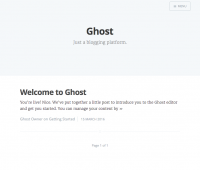
Now you can create an account in the CMS by visiting http://your_blog/admin. Log in with your email and password, and you’ll be all set.
For further customization, check the official documentation. Moreover, you can enhance your blog’s capabilities by integrating additional Docker containers, such as Nginx for frontend services or isolated mail systems, making management and migration of resources easy.
Need Help?
Our support team is available 24/7 to assist you with any questions or issues.
Contact Support